Palette Customization with Mednafen
I received Metroid: Samus Returns in the mail this week, which is a 3DS remake of the original Metroid II: Return of Samus for the GameBoy. Before I started playing Samus Returns, I wanted to take another romp through the original, so I hopped on OBS and recorded myself on a casual run. This morning, I watched Emptyeye's great single-segment 100% run of Metroid II, which inspired me to record another run. Before that, though, I wanted to see what I could do to make the game pop a little bit, so it looks and feels good to watch. Here's the end result:
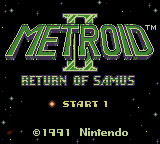
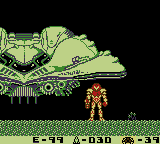
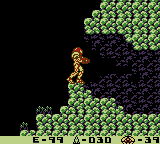
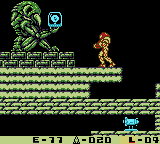
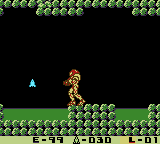
Verdant Miasma - a palette for Metroid 2: Return of Samus, by zlg
Setup
The first issue I had was figuring out Mednafen's palette format. Mednafen's
documentation is rather terse on this, but a brief chat with someone in
#mednafen on Freenode set things straight for me.
Here's what you need to know about palettes, at least for the gb plugin (for
original GameBoy games):
- Colors are in descending brightness, starting with the brightest
- The brick GB and Pocket can only do four colors
- Super GameBoy can do eight colors; one set of four for sprites, and another for tiles
- Mednafen supports up to twelve colors, but Metroid II only uses the first ten.
Here's a quick rundown of the colors for Metroid II:
- Tile highlight color
- Tile mid-range color
- Tile shading color
- Background color
I set the first three colors very deliberately. I needed colors that would add to the mood of SR388 without looking too cartoony. However, each shade is used in different ways in different areas, so I needed a set of three colors that wouldn't clash when mixed, but had enough of a hue shift to be useful in multiple contexts.
The colors I settled with are a faded beige, semi-gray green, and a subdued purple. I felt that they represented SR388 well, and the purple really adds to the immersion with the way the acid and some backgrounds look. Unfortunately, the game is rather monochrome to begin with, so there wasn't much I could do to combat that.
That's it for the original GameBoy palette. If you're playing via Super GameBoy, there are four more colors:
- Samus' yellow portion
- Samus' red portion
- Samus' outline
- Pause/transition/extra detail color
The eighth color (4th in this set) is interesting, because it shows up in a few random places. For instance, it's used to create the shadowy look of the pause screen, Samus' silhouette when making room transitions, and appears as part of the environment from time to time. On Super GameBoy, I believe the 8th color is set to match color 4, so Samus's sprite is never visible during transitions. So in practice, Super GameBoy only offers about six or seven colors.
The colors chosen are pretty obvious: Samus's suit needs to be some shade of yellow, and the accent needs to be red. Her outline was kind of a toss-up: Dark red looks good, but bleeds into the yellow a bit much. I opted for a desaturated medium brown, which makes a good accent color and dithers well due to being a neutral color. The transition color is a steel blue, to add a hint of hue shifting to any environments that use the color (like the starting area).
Remember that I mentioned Mednafen supports up to twelve colors? Metroid II supports up to ten total:
- being struck/item highlight
- being struck/item shade
- unused
- unused
Colors 9 and 10 are used when you or an enemy flashes upon being struck, and for item pickups that flash, such as missiles or Power Suit upgrades. Originally, I was going to go for light and medium gray, similar to Super Metroid's look for missiles. It looked a little too plain. I could've went with another Super Metroid look (bright yellow and magenta), but I felt like the game has enough yellow as it is; why add more?
The bright teal colors for 9 and 10 worked out fantastically, as they aid readability and are different enough from the rest of the game's colors to pop out to the viewer. Once I had this nailed down, I knew I had found the right palette for the game.
The Palette
So the actual colors are as follows:
#BED287#3A882B#3F2E50#000000#D2CF72#AE1919#4B320C#354C53#6AECFF#2493A4
Plug those into a color previewer or just about anything else, and you'll see them:

Hex Values Ahoy!
Next, I had to come back to Mednafen and figure out how to pull this together.
As I mentioned earlier, Mednafen's documentation didn't cover much. It just said
it supported 4, 8, or 12 color triplets in RGB format. I later learned that this
is in binary, not plain-text, so I needed a hex editor. Thankfully, Gentoo has
app-editors/hexedit. Most other GNU/Linux distros should have some sort of hex
editor available, too. 1 Once you've gotten a hex editor, you'll need to
enter the hex values, one after the other, in the list above. The result should
look something like this:
00000000   BE D2 87 3A  88 2B 3F 2E  50 00 00 00  D2 CF 72 AE  19 19 4B 32  0C 35 4C 53     ...:.+?.P.....r...K2.5LS
00000018   6A EC FF 24  93 A4 62 79  20 7A 6C 67                                            j..$..by zlg
You'll need to make sure it's exactly like the above, in a hex editor, or it won't work. Since Metroid II doesn't use the last two colors, I had 6 extra bytes to work with, so I added a by-line, because why not?
Putting it All Together
If you don't have a hex editor or aren't savvy enough to figure one out for
yourself, here's a link to the resulting .pal file:
Verdant Miasma: a Metroid II: Return of Samus palette by zlg (it's up at the top of this article, too)
You'll want to save it with a .pal extension, under
$HOME/.mednafen/palettes, with the same name as the ROM. For example:
"$HOME/.mednafen/palettes/Metroid 2 - Return of Samus.pal". Windows and OS X
users will need to replace $HOME/.mednafen with the path where their Mednafen
configuration is saved.
The next time you run the game, it should greet you with a nice, colorized palette!
It was fun putting this palette together. I hope you enjoy it as much as I do.
-
Vim has a binary editing mode (
-bon the command line), but it was adding an extraneous byte, causing Mednafen to complain at the file size mismatch for the palette. ↩